Downtown Computer Center

COMPUTER RENTAL-SERVICE-SALES

Member Login
User Name:
Password:
Register
1035 Davie St, 604 682-5240
Vancouver V6E 1M7
British Columbia
Canada
Tel 604.682.5240 604.682-5272
Fax 604.568-5241
Email Us

Laptop Repair

Free Verification of  Laptop Notebook Computers (Mac or PC) in Vancouver            20% OFF FOR REPEAT CUSTOMERS
We Repair iMac, iBook, MacBook, Repair and trade PowerBook, iBook, MacBook, MacBook Pro, Power Mac, iMac G4, iMac G5, iMac Intel, Mac Mini

Laptop Powering on and Shutting Off Repeatedly..Or.. Powering On and Having No Video...Or..Power Strip Lights Up, Beeps,Shuts Down...

Or..No Power At All...Or.. Intermittant Loss Of Wireless/Video Goes In And Out/Touchpad Slows and Freezes...

WE REPAIR ANY BRAND AND MODEL (Mac or PC) WE CAN FIX ALL, OR NO PAY

mac_logo.gif

compaq.jpg dell.jpg acer.jpg toshiba.jpg
Mac DELL ACER TOSHIBA
COMPAQ E MACHINE FUJITSU GATEWAY HP

logo.jpg

We repair all(*) brands of Laptop/Notebook computers, and our high level of technical expertise makes us the perfect choice for you to have us resolve any problems you may have with portable computing.  If you bring us your computer, we will lend you a replacement until your laptop gets repaired.
*Except Apple/Mac
To assist our customers with 'how we categorize Notebook Issues' based on marketplace repair demands, we have our Notebook Repair area as follows:

SOFTWARE ISSUES

Virus Free: Full Virus Scan Virus Removal Install Free Anti-Virus $59
SpyWare Free: Full SpyWare Scan SpyWare Removal Install Free Anti-Spyware $49.99
Both Virus & SpyWare Free: Full Virus and SpyWare Scan Virus & SpyWare Removal Install Free Anti-Virus & Anti-SpyWare $79.99

Data Recovery & Data Transfer:


We can retrieve your data from both working or non-working computers and transfer it to CD or DVD or Hard Drive    

  
from $39.99


System Restore:


Restore system to manufacturer's defaults, install Anti-Virus, install operating system updates necessary

Restore Windows & all drivers, updates


Install Anti-Virus & Firewall


(when restore CD's are available)

$89.99


Windows Install Windows operating system installation Install Windows & all drivers, updates Install Anti-Virus & Firewall (when installation CD's not available)

$99.00
All other software issues: $89.00/hr (labor)

HARDWARE ISSUES

        Notebook Water/Liquid Damages

Any liquid into a Notebook computer should be treated very carefully.  We recommend that you do not try to turn on your Laptop for at least one week, and bring it to our 1035 Davie Street, Downtown location, as soon as possible, where we can open it and try to dry it out for you.  Most common 'liquid in contact with a Laptop' is damage to the keyboard or Mainboard.

cost: from $69 


Overheating Problem

Indications of laptop overheating problems:

  1. The laptop suddenly shuts down by itself without warning. When it just started, the laptop was shutting down after 1-2 hours and now it shuts down after 5-10 minutes of operation.
  2. The laptop works fine when it runs idle, but shuts down as soon as you start using any memory demanding applications (DVD player, image editing software, video editing software, etc.).
  3. The keyboard and the bottom of your laptop are very hot when the laptop is working.
  4. The CPU fans are working all the time at maximum rotation speed and operate much louder than before.  

          Cleaning heatsink and fan

cost: from $45

                                                                Power Jack Issues

PJ011.jpg         cost: $195         PJ011.jpg

All Laptops POWER JACK  problem can be fixed at Downtown Computer Centre.

Your Notebook has power jack issues if: 

  • Your laptop fell from the table or somebody tripped on the wire and now you have to 'wiggle the power cable' in order for the laptop to get power?
  • When you plug your power cable in the back of the laptop the connection feels loose?
  • Your Laptop / Notebook battery doesn't charge anymore?
  • The display on your laptop flickers and/or you can hear "popping" and "scratching" noises from the back of the laptop?

Most power connectors are damaged by accident:  falling, tripping over a wire, etc.  If the DC-IN power connector is no longer connected to the motherboard, the power adaptor can no longer supply power to the laptop, so the battery supplies power until it dies.

When the DC power jack is loose, the most important step is to stop wiggling it and get it replaced.  Most laptops draw quite a lot of power, typically 3.5 to 6A.  If the DC power connector is loose under these conditions, the harder it is to fix, making it impossible in some cases.

We service laptops with bad/broken DC power connectors by replacing them.  This is much cheaper than replacing the laptop's mainboard.  Our current success rate for this repair is over 95%.  However, there are rare cases when the mainboard is damaged beyond repair.  Unfortunately it is impossible to estimate that before disassembling the laptop and removing the DC connector.

How we do it?

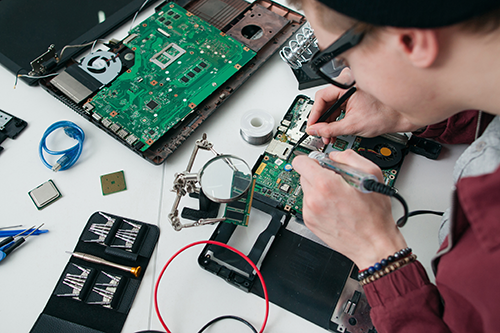
  • Taking the motherboard out of the notebook.
  • Desolder the power jack from motherboard that you we already taken out from the laptop. Both the motherboard and the power jack have to be cleaned properly
  • When the power jack is successfully removed, we clean the oxidized contacts, install the new power jack,in right position  and place the solders to all sides of the powerjack.
  • Assemble all parts together again.

The whole procedure: complete disassembling, desoldering, soldering new connector, adapting the laptop case to fit the new connector (if necessary), and full reassembling, usually requires from 3 to 3:30 hours labor.

   Power Jack Repair DC Power Jack on the laptop is also known as an AC DC (direct current) power port, dc power input, dc power connector, dc power socket, pin, inlet, prong, point, inlet, receptacle part, basically it is an inside piece in the laptop where the dc power plug (tip part of your AC adapter cable) plugs into.  It usually goes bad if for quite some time you had to wiggle the plug around to make the system power up or charge the battery, it also goes bad if you would accidentally drop the notebook computer from a table and it lands on a dc power plug that would push and break the inside power jack connector of your laptop. Basically, if your laptop battery is not charging anymore, you have to wiggle or jiggle the plug constantly to make the system work because the piece inside is loose, the screen flickers, then it is probably the dc power jack issue.

Our jobs are taking the laptops apart, remove (usually unsolder) the dc power jack from the laptop computer's motherboard, put a brand new dc power jack in, solder the new power jack to the motherboard, put your laptop back together, test it out, make sure everything works and everything was connected properly, package the laptop and send it back to you.  

  We specialize in power jack replacements, we have all parts in stock at all times.  Since we have three full time techs who only work on fixing dc power jacks on laptop computers we also provide the fastest turnaround times in town.

If you decide to ship  your laptop to us, please pack your laptops very well, please include your AC power adapter with the package, feel free to remove and keep the hard drive, write a note about who and where to send the laptop back.

  Screens Problems

            Broken/Damaged Screen/Monitor:

  • In most cases the screen itself must be replaced entirely, and the process of contacting your Laptop/Notebook's manufacturer to order the screen for that precise model is time consuming.  The cost of purchasing the actual screen can sometimes be expensive as well, but with us you can be assured that we will do our best to find the most cost-effective way for you to have us repair your broken screen.

 Estimated Repair Cost, For most Brands and Models:

 Screen from:  $99 

 Screen Installation: $55

 Screen order/ replacement: 2 working days 


Inverter Problem

 You have to replace the Inverter if:

  • You still can see an image on the screen but it’s very dim, or  the back light comes back for a while but then goes off again.
    -or The screen always stay black  but you still can make out an image on the LCD. It’s dark, but the image is still there.

 Estimated Repair Cost $89 to $129  parts and labor.


Mainboard Problems

 In most cases Replace a Mainboard is more expensive than repair,  The first thing to be done is to disassemble your Laptop/Notebook, and then try to find the problem and then fix the mainboard. Bring your computer in to us, and we will diagnose the problem for you - within 24 hours we will know what the repair requirement will be for your computer.

  •  We can repair most problem related to mainboard
  •  We can fix Most  HP defective models such as: HP DV 2000, DV 6000, and DV 9000 series.
  •  We can repair Faulty Nvidia Chip, Both Intel And AMD Based Motherboards.
  •  We can fix your laptop if:
    Laptop Powering on and Shutting Off Repeatedly..Or.. Powering On and Having No Video...Or... Power Strip Lights Up, Beeps,Shuts Down...Or..No Power At All...Or.. Intermittant Loss Of Wireless/Video Goes In And Out/Touchpad Slows and Freezes..

disassembly and assembly cost: $69                 mainboard repair cost: $89

 Keyboard Problems
  • Keyboards often become damaged even in the normal course of using the Laptop/Notebook, and they require replacing after a certain amount of time.  To repair a single key or a small number of keys is not usually not possible, or practical - replacing the keyboard entirely is not one of the more expensive services we offer.

             Keyboard cost from $39.99

             Keyboard Installation: $39.99 (labor)

     Upgrades

  • It is possible to upgrade your Laptop/Notebook in many different ways, but in general there are two main areas:
  • Hardware:
    • Memory Chip (RAM - Random Access Memory)
    • Hard Drive (HDD)
  • Software:
    • You may upgrade your Operating System (Windows) from Windows98, 98SE, ME, to Win2000, or any to Win2000 or to Windows XP Home or XP Pro, providing your Laptop/Notebook meets the requirements(*)
      • (* To upgrade your Operating System to Windows XP Home or Windows XP Pro, the requirements are that you have at least 256megabytes of RAM (256mb RAM) and a minimum of 2 Gigabytes (2Gb) of Hard Drive space available for the system to install properly.

cost from $39.99

                                                      Professional Data Recovery
  • We can recover data from virtually every operating system and storage device in any data loss situation, using proprietary data recovery tools and techniques, without voiding equipment warranties. The Computer Doctor data recovery team particularly recommend this service in the following circumstances:
  • Physically damaged Hard Drive
  • HD which has been dropped
  • HD which has been in fire or water
  • Internal mechanical or electric problems
  • HD has been formatted

The total cost of your recovery depends on the nature and severity of your data loss situation.

NO DATA NO FEE! SATISFACTION IS GUARANTEED.

cost from $39.99


What we can do for your Notebook

  • Laptop repairs for all major brands such as IBM Thinkpad, Samsung, NEC, Hitachi, Apple, Evesham, AJP, Mesh, Acer, Toshiba, Dell, Sony Vaio, Packard Bell, Tiny, Fujitsu-Siemens, HP, Hewlett-Packard, Compaq, Advent and Gateway.
  • Fast data recovery and data extraction from failed or faulty laptop hard drives
  • Laptop hard drive replacements or upgrades + Laptop memory upgrades
  • Laptop virus protection and virus removal + malware, adware, or malicious software removal.
  • Broken laptop power socket repairs, damaged USB port repairs, laptop backlight repairs, broken laptop keyboard repairs and replacements
  • Laptop hard disk data recovery
  • Laptop hard disk replacement
  • Laptop hard disk upgrades
  • Laptop data transfer
  • Laptop data retrieval
  • Laptop memory upgrades
  • Laptop screen replacement
  • Laptop power problem fix
  • Laptop CD/DVD repairs
  • Laptop CD/DVD replacement
  • Laptop keyboard repairs
  • Laptop keyboard replacement
  • Laptop touchpad and track point repairs
  • Laptop CPU replacement
  • Laptop power connector repairs
  • Laptop power connector replacement
  • Laptop component-level repairs
  • Laptop Battery Replacement
  • Laptop Power supply replacement
  • Laptop virus removal
  • Laptop fan replacement
  • Laptop fan repairs
  • Laptop system recovery and Operating System installation
  • Laptop spyware or adware removal
  • Overheating problem